


GitHub's Uphill Climb: Optimizing Diff Lines for Peak Performance
Pull requests stand as the vibrant core of GitHub, where countless engineers dedicate a significant portion of their professional lives. Given GitHub's immense scale, handling pull requests that range from minor one-line fixes to colossal changes spanning thousands of files and millions of lines, the review experience must remain exceptionally fast and responsive. The recent rollout of the new React-based experience for the Files changed tab, now the default for all users, marked a pivotal investment in ensuring robust performance, especially for these challenging large pull requests. This commitment involved consistently tackling difficult problems like optimized rendering, interaction latency, and memory consumption.
Before these optimizations, while most users enjoyed a responsive experience, large pull requests inevitably led to noticeable performance decline. Extreme cases saw JavaScript heap exceeding 1 GB, DOM node counts surpassing 400,000, and page interactions becoming severely sluggish or even unusable. Key responsiveness metrics like Interaction to Next Paint (INP) soared above acceptable levels, creating a tangible sense of input lag for users. This article delves into the detailed journey GitHub undertook to dramatically improve these core performance metrics, transforming the diff review experience.
Navigating Performance Bottlenecks: A Multi-Strategy Approach
When initiating the performance investigation for the Files changed tab, it quickly became apparent that a single "silver bullet" solution would not suffice. Techniques designed to preserve every feature and browser-native behavior often hit a ceiling with extreme data loads. Conversely, mitigations aimed solely at preventing worst-case scenarios might introduce unfavorable tradeoffs for everyday reviews.
Instead, GitHub's engineering team developed a comprehensive set of strategies, each meticulously designed to address specific pull request sizes and complexities. These strategies were built upon three core themes:
- Focused Optimizations for Diff-Line Components: Enhancing the efficiency of the primary diff experience for the majority of pull requests. This ensured medium and large reviews remained swift without compromising expected functionalities like native find-in-page.
- Graceful Degradation with Virtualization: Ensuring usability for the largest pull requests by prioritizing responsiveness and stability, and intelligently limiting what is rendered at any given moment.
- Investment in Foundational Components and Rendering Improvements: Implementing enhancements that yield compounding benefits across every pull request size, irrespective of the user's specific viewing mode.
These strategic pillars guided the team's efforts, allowing them to systematically tackle the root causes of performance issues and set the stage for subsequent architectural refinements.
Deconstructing V1: The Cost of an Expensive Diff Line
GitHub's initial React-based implementation, referred to as v1, laid the groundwork for the modern diff view. This version was an earnest effort to port the classic Rails view to React, prioritizing the creation of small, reusable React components and maintaining a clear DOM tree structure. However, this approach, while logical at its inception, proved to be a significant bottleneck at scale.
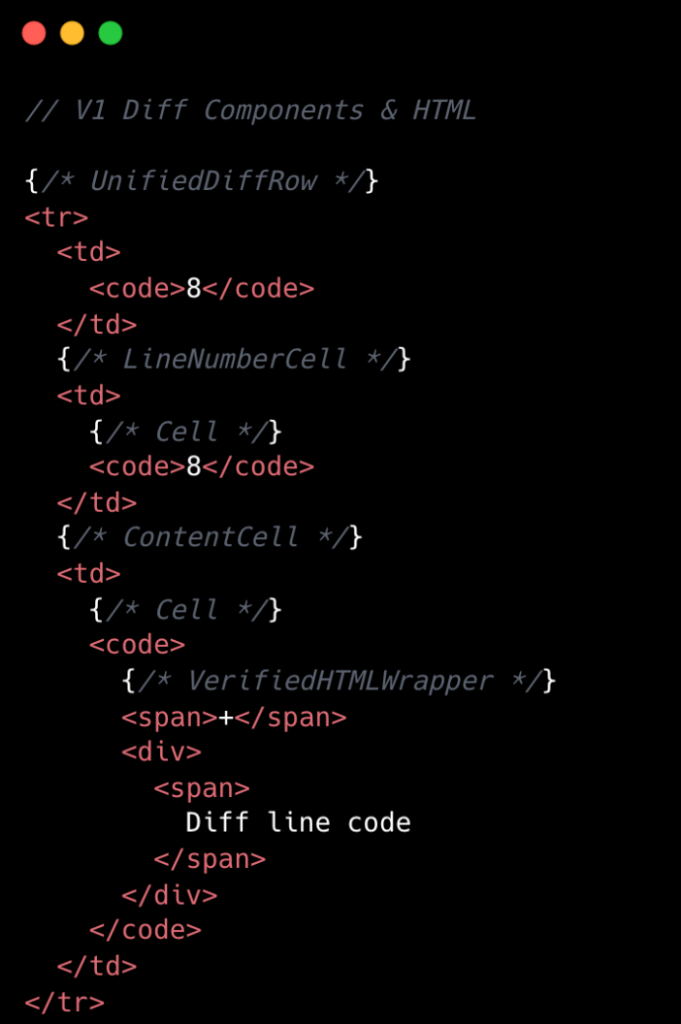
In v1, rendering each diff line was an expensive operation. A single line in a unified view typically translated to about 10 DOM elements, while a split view required closer to 15. This count would further escalate with syntax highlighting, introducing many more <span> tags. At the React layer, unified diffs contained at least eight components per line, and split views a minimum of 13. These were baseline counts, with extra UI states like comments, hover, and focus adding even more components.
The v1 architecture also suffered from a proliferation of React event handlers. While seemingly innocuous on a small scale, a single diff line could carry 20 or more event handlers. When multiplied across thousands of lines in a large pull request, this quickly compounded, leading to excessive overhead and increased JavaScript heap usage. This complexity not only impacted performance but also made development and maintenance more challenging. The initial design, effective for bounded data, struggled significantly when faced with the unbounded nature of GitHub's diverse pull request sizes.
To summarize, for every v1 diff line, the system had:
- Minimum of 10-15 DOM tree elements
- Minimum of 8-13 React Components
- Minimum of 20 React Event Handlers
- Numerous small, reusable React Components
This architecture directly correlated larger pull request sizes with slower INP and increased JavaScript heap usage, necessitating a fundamental re-evaluation and redesign.
Revolutionizing Rendering: The Impact of V2 Optimizations
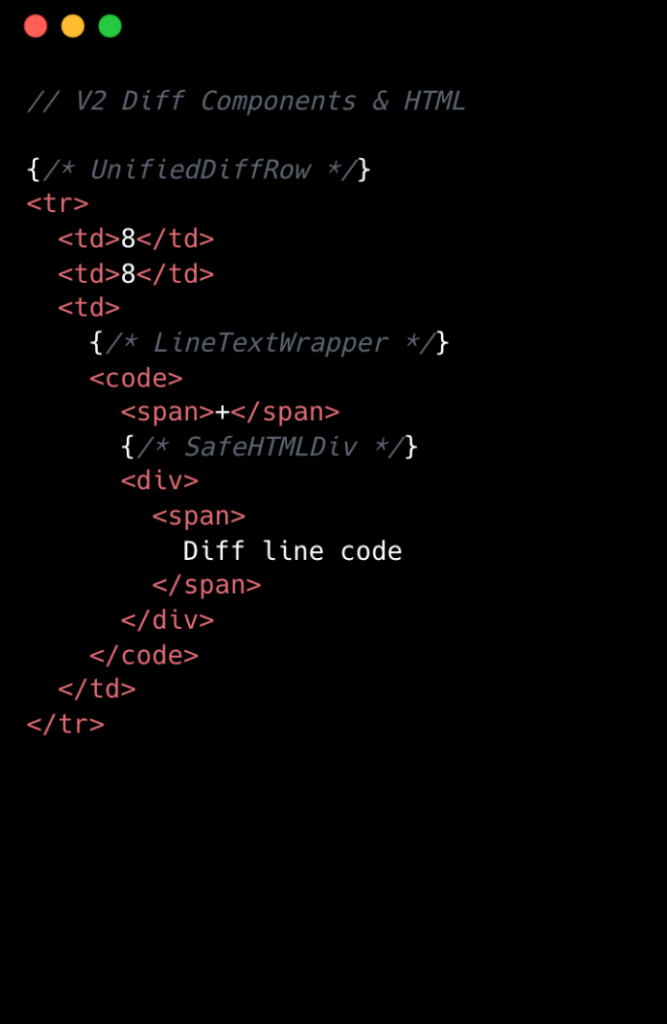
The transition to v2 marked a significant architectural overhaul, focusing on granular, impactful changes. The team embraced the philosophy that "no change is too small when it comes to performance, especially at scale." A prime example was the removal of unnecessary <code> tags from line number cells. While dropping two DOM nodes per diff line might seem minor, across 10,000 lines, this instantly equated to 20,000 fewer nodes in the DOM, showcasing how targeted, incremental optimizations yield substantial improvements.
The visual comparison below highlights the reduced complexity from v1 to v2 at the component level:
Streamlined Component Architecture
A core innovation in v2 involved simplifying the component tree. The team moved from eight React components per diff line down to two. This was achieved by eliminating deeply nested component trees and creating dedicated components for each split and unified diff line. While this introduced some code duplication, it drastically simplified data access and reduced overall complexity. Event handling was also centralized, now managed by a single top-level handler using data-attribute values, replacing the numerous individual event handlers of v1. This approach drastically streamlined both code and performance.
Intelligent State Management and O(1) Data Access
Perhaps the most impactful change was relocating complex app state, such as commenting and context menus, into conditionally rendered child components. In an environment like GitHub, where pull requests can exceed thousands of lines, it is inefficient for every line to carry complex commenting state when only a small fraction will ever have comments. By moving this state into nested components, the diff-line component's primary responsibility became purely code rendering, aligning with the Single Responsibility Principle.
Furthermore, v2 addressed the issue of O(n) lookups and excessive useEffect hooks that plagued v1. The team adopted a two-part strategy: strictly restricting useEffect usage to the top level of diff files and establishing linting rules to prevent their reintroduction in line-wrapping components. This ensured accurate memoization and predictable behavior. Concurrently, global and diff state machines were redesigned to leverage O(1) constant-time lookups using JavaScript Map objects. This allowed for fast, consistent selectors for common operations like line selection and comment management, significantly enhancing code quality, improving performance, and reducing complexity by maintaining flattened, mapped data structures. This meticulous approach to optimizing developer workflows and underlying architecture ensures a robust, scalable system.
The Measurable Impact: V2 Delivers Quantifiable Gains
The meticulous architectural and code-level optimizations implemented in v2 yielded profound, quantifiable improvements across key performance metrics. The new system runs significantly faster, with a massive reduction in JavaScript heap usage and INP scores. The following table showcases the dramatic improvements observed on a representative pull request with 10,000 line changes in a split diff setting:
| Metric | v1 | v2 | Improvement |
|---|---|---|---|
| JavaScript Heap | 1GB+ | 250MB | 75% |
| DOM Nodes | 400,000+ | 80,000 | 80% |
| INP p95 | 1000ms+ | 100ms | 90% |
These figures underscore the success of GitHub's multi-pronged strategy. A 75% reduction in JavaScript heap size and an 80% decrease in DOM nodes not only translates to a lighter browser footprint but also directly contributes to a more stable and responsive interface. The most striking improvement, a 90% reduction in INP p95 (the 95th percentile of interaction latency), means that 95% of user interactions are now completed within a mere 100 milliseconds, virtually eliminating the input lag that plagued large pull requests in v1. This significantly enhances the user experience, making large code reviews feel as fluid and responsive as smaller ones.
GitHub's commitment to continuous improvement, evidenced by this deep dive into diff-line optimization, is a testament to their dedication to providing a world-class developer platform. By rigorously analyzing performance bottlenecks and implementing targeted architectural solutions, they have not only resolved critical scalability issues but also set a new standard for responsiveness in their core product. This focus on performance ensures that engineers can efficiently engage in crucial tasks like code reviews, ultimately leading to higher code quality and security and a more productive development environment.
Original source
https://github.blog/engineering/architecture-optimization/the-uphill-climb-of-making-diff-lines-performant/Frequently Asked Questions
What is the 'Files changed' tab in GitHub pull requests and why was its performance critical?
What were the primary performance challenges GitHub faced with large pull requests in the v1 architecture?
How did GitHub approach solving the complex performance issues, moving beyond a 'silver bullet' solution?
What were the key limitations of the 'v1' diff rendering architecture that made it unsustainable for scale?
What specific architectural changes were implemented in 'v2' to drastically improve diff line performance?
How did the GitHub engineering team achieve quantifiable improvements in JavaScript heap, DOM nodes, and INP metrics with v2?
What is Interaction to Next Paint (INP) and why is its improvement significant for GitHub's user experience?
Stay Updated
Get the latest AI news delivered to your inbox.